
Growth Opportunities by Customer Journey: fixing your store stage by stage
The Playbook in Growth Opportunities holds the same set of best practices in two arrangements. By Customer Journey is the one that follows your customer rather than your org chart — it lines the work
The Playbook in Growth Opportunities holds the same set of best practices in two arrangements. By Customer Journey is the one that follows your customer rather than your org chart — it lines the work up in the order a shopper actually experiences your store, from first landing to buying again.
Use this view when you know where customers are struggling but not which feature fixes it. If instead you know which outcome you want to move — AOV, repeat purchase, search relevance — the By Goals view is the better door into the same content.
Before you start — Sledge Core must be active on your theme. This view is most useful alongside Journey Performance in Analytics, which tells you which stage is actually leaking; bring that number with you and you’ll know exactly which stage to open.
The five stages
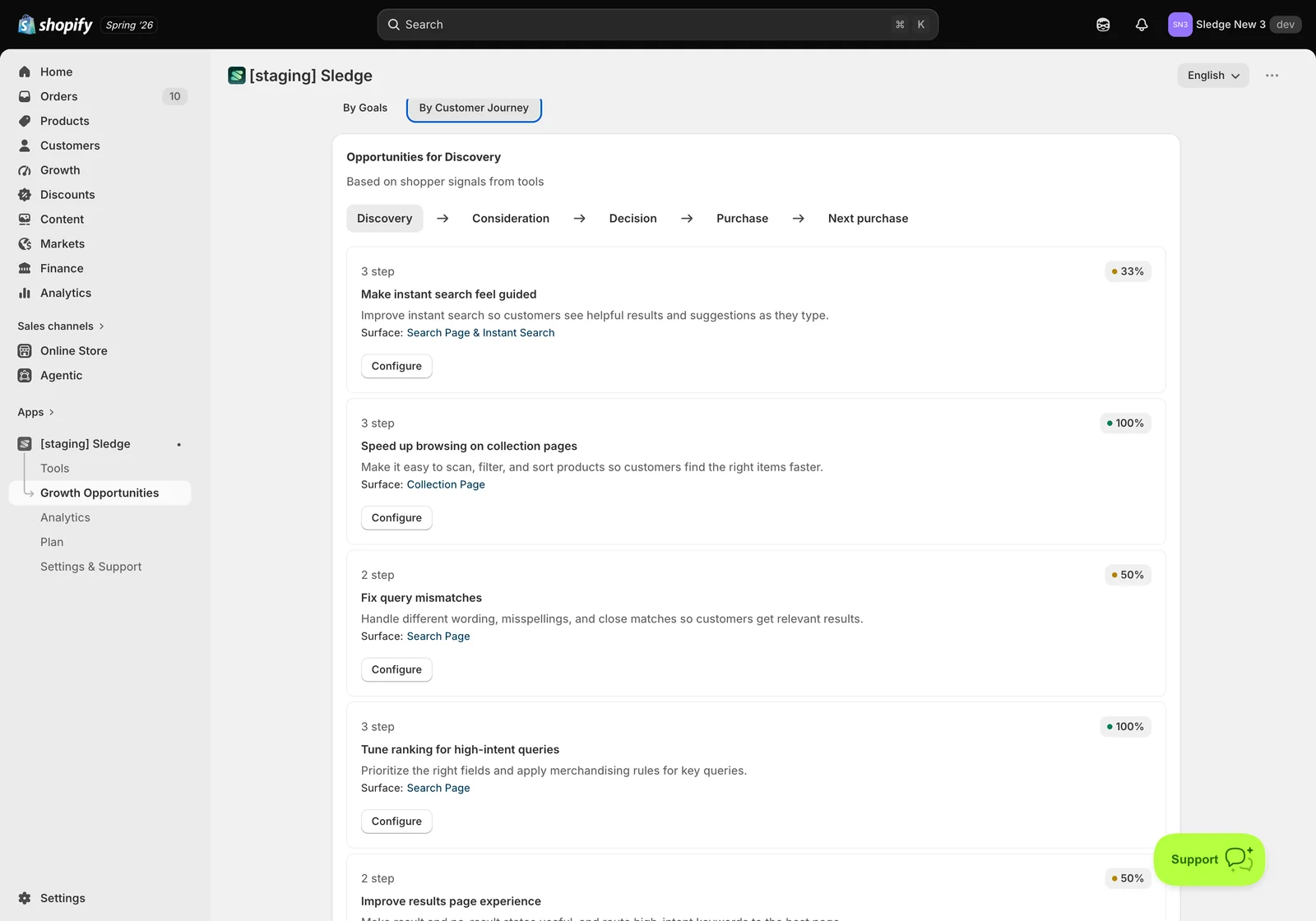
Open Growth Opportunities and choose the By Customer Journey tab. The work is grouped into five stages, shown as a row you can move through:
- Discovery — the customer has arrived and is working out what you sell. Search, browsing and collection pages dominate here.
- Consideration — they’re looking at specific products and comparing. Product pages, trust and reassurance matter.
- Decision — items are in the cart and they’re deciding whether to go through with it. Cart drawer and friction removal.
- Purchase — completing the order, plus anything that lifts the basket at the last moment.
- Next purchase — what happens after the order, to bring them back.
The heading tells you what you’re looking at — for example Opportunities for Discovery — with the note Based on shopper signals from tools, meaning the suggestions are informed by real behaviour on your store, not a generic checklist.
What each stage contains
Within a stage, every card is a best practice with the same anatomy as the By Goals view: a step count, a completion percentage, a plain-language description, the Surface it applies to, and a Configure button.
From Discovery in this store, for example:
- Make instant search feel guided — improve instant search so customers see helpful results and suggestions as they type. Search Page & Instant Search.
- Speed up browsing on collection pages — make it easy to scan, filter and sort so customers reach the right items faster. Collection Page.
- Fix query mismatches — handle different wording, misspellings and close matches. Search Page.
- Tune ranking for high-intent queries — prioritise the right fields and apply merchandising rules. Search Page.
- Improve results page experience — make result and no-result states useful, and route high-intent keywords to the best page. Search Page.
- Launch campaigns with banners and timers — seasonal messaging and urgency. Homepage, Global & Product Page.
- Make campaigns discoverable in search — surface campaigns through suggestions and banners. Search Page.
- Merchandising for seasonal pushes — pin and boost key products, and notify customers when items return. Collection Page.
Notice that several of these also appear under goals like Improve search relevance. That’s deliberate — it’s one body of work shown through a different lens, and progress you make in one view immediately shows in the other.
Configuring a practice
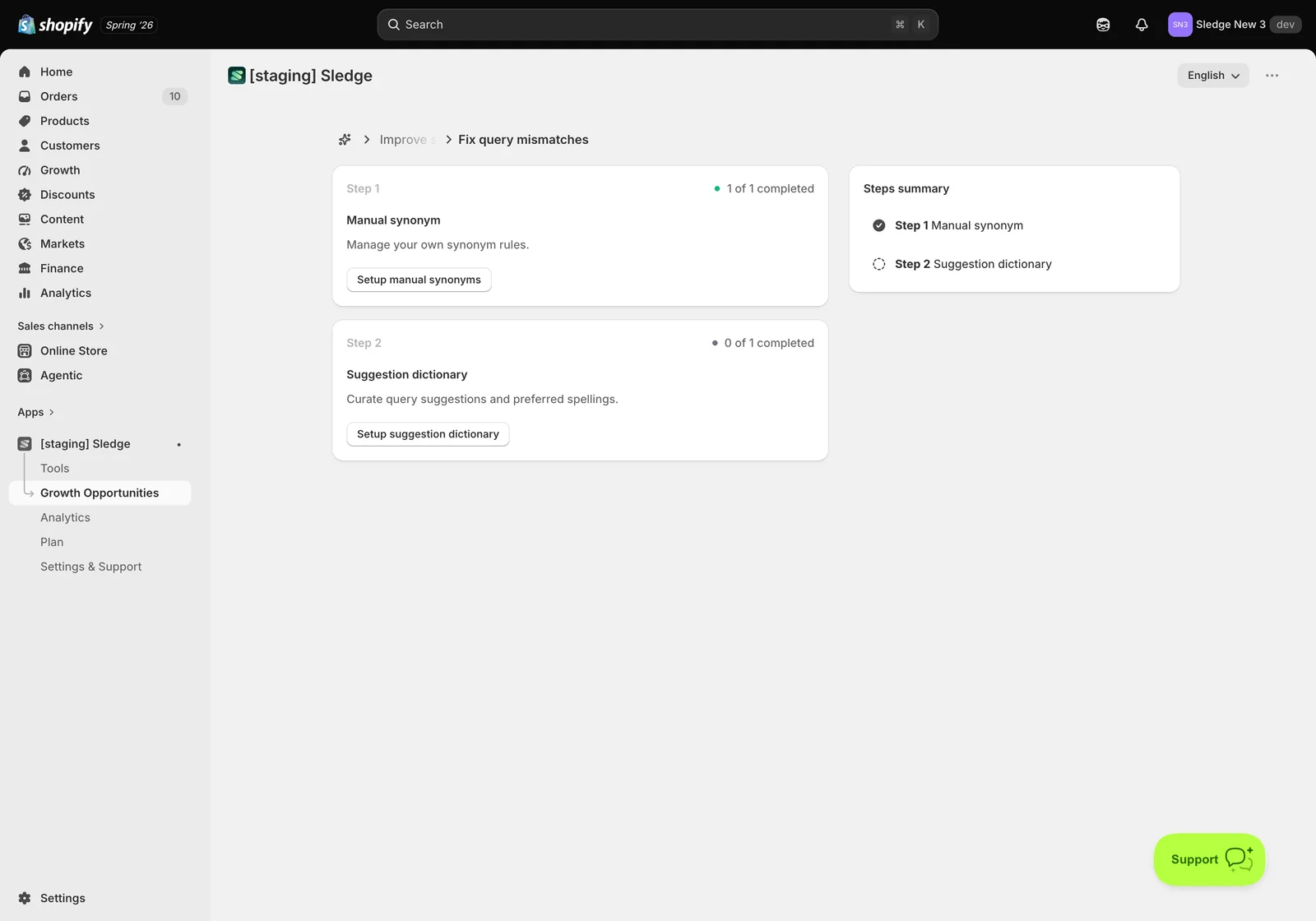
Configure opens the same step-by-step screen used throughout the Playbook: numbered steps, a completion count per step, and a Steps summary so you can see the whole shape of the task.
Taking Fix query mismatches: Step 1 — Manual synonym lets you manage your own synonym rules so a search for one word still finds products named with another, and Step 2 — Suggestion dictionary lets you curate suggestions and preferred spellings so the dropdown steers customers toward searches that return results. Each step links straight to the screen where you do it.
Choosing a stage to work on
The advantage of this view is that it maps onto a diagnosis. Open Analytics → Journey Performance, find the stage with the worst step-through rate, then open that same stage here.
- Losing people at Discovery → Consideration? Visitors aren’t reaching product pages — work the Discovery stage: search quality, filters, collection browsing.
- Losing them at Consideration → Decision? They see products but don’t add to cart — work Consideration: trust, product page conversion.
- Losing them at Decision → Purchase? Carts aren’t becoming orders — work Decision: cart drawer friction, reassurance, incentives.
- Few returning customers? Work Next purchase.
This is the difference between guessing and fixing. Rather than configuring whichever feature you happened to read about, you find the leak, open that stage, and work the practices that address it.
By Journey or By Goals?
They contain the same practices, so use whichever matches how you’re thinking:
- Use By Customer Journey when the problem is behavioural — “people leave before reaching a product page”. It pairs directly with Journey Performance.
- Use By Goals when the problem is commercial — “our average order value is too low”. It pairs with the goals reported in Analytics.
Progress is shared, so completing a step in one view updates the other.
Not seeing progress? A step only counts once its setting is saved and enabled — opening a screen isn’t enough. Stages tied to features you haven’t switched on will look untouched, which is accurate rather than broken. And because suggestions are informed by shopper signals, a store with little traffic will see a thinner list until customers start interacting.
Related
- Growth Opportunities by Goals: working through the playbook outcome by outcome
- Understanding your Sledge Dashboard: revenue, growth intelligence, and live signals
- How to Enable Sledge Core and Complete the Initial Setup ?
- How do I set up Instant Search?
- How do I set up Personalized Picks?
- How do I set up Recently Viewed?
Last updated on
Growth Opportunities
Growth Opportunities in Sledge — 2 guides covering setup and day-to-day use.
Growth Opportunities by Goals: working through the playbook outcome by outcome
Growth Opportunities is Sledge’s standing to-do list for your store. It monitors your data every week, works out what deserves attention, and turns that into a checklist you can work through — instead