
Growth Opportunities by Goals: working through the playbook outcome by outcome
Growth Opportunities is Sledge’s standing to-do list for your store. It monitors your data every week, works out what deserves attention, and turns that into a checklist you can work through — instead
Growth Opportunities is Sledge’s standing to-do list for your store. It monitors your data every week, works out what deserves attention, and turns that into a checklist you can work through — instead of leaving you to guess which of the nine tools to configure next.
The list is called the Playbook, and it has two views of the same content. This guide covers By Goals, which groups the work by the business outcome it moves. If you’d rather organise the same tasks by where customers are in their journey, see the By Customer Journey guide.
Before you start — Sledge Core must be active on your theme. Findings are based on your own order and behaviour data, so a new store will see fewer of them at first; they sharpen as orders build up.
Reading the summary bar
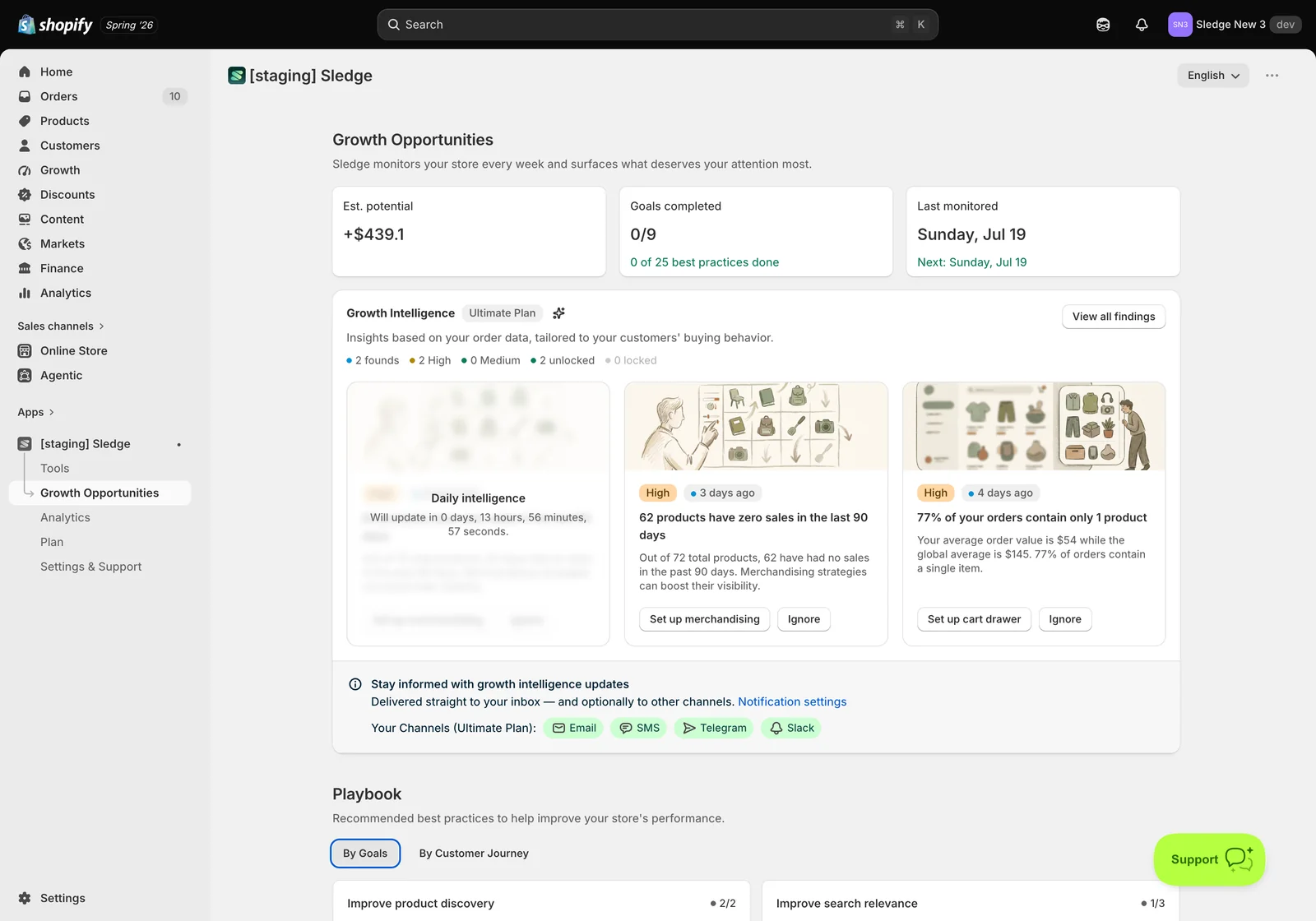
The header explains the promise: Sledge monitors your store every week and surfaces what deserves your attention most. Four figures sit beneath it:
- Est. potential — the estimated revenue available if you complete the outstanding work. Treat it as a rough sizing to help you prioritise, not a forecast.
- Goals completed — how many of the nine goals are fully done.
- Best practices done — the finer-grained count across all goals (for example 0 of 25).
- Last monitored / Next — when Sledge last reviewed your store and when it will look again.
Growth Intelligence findings
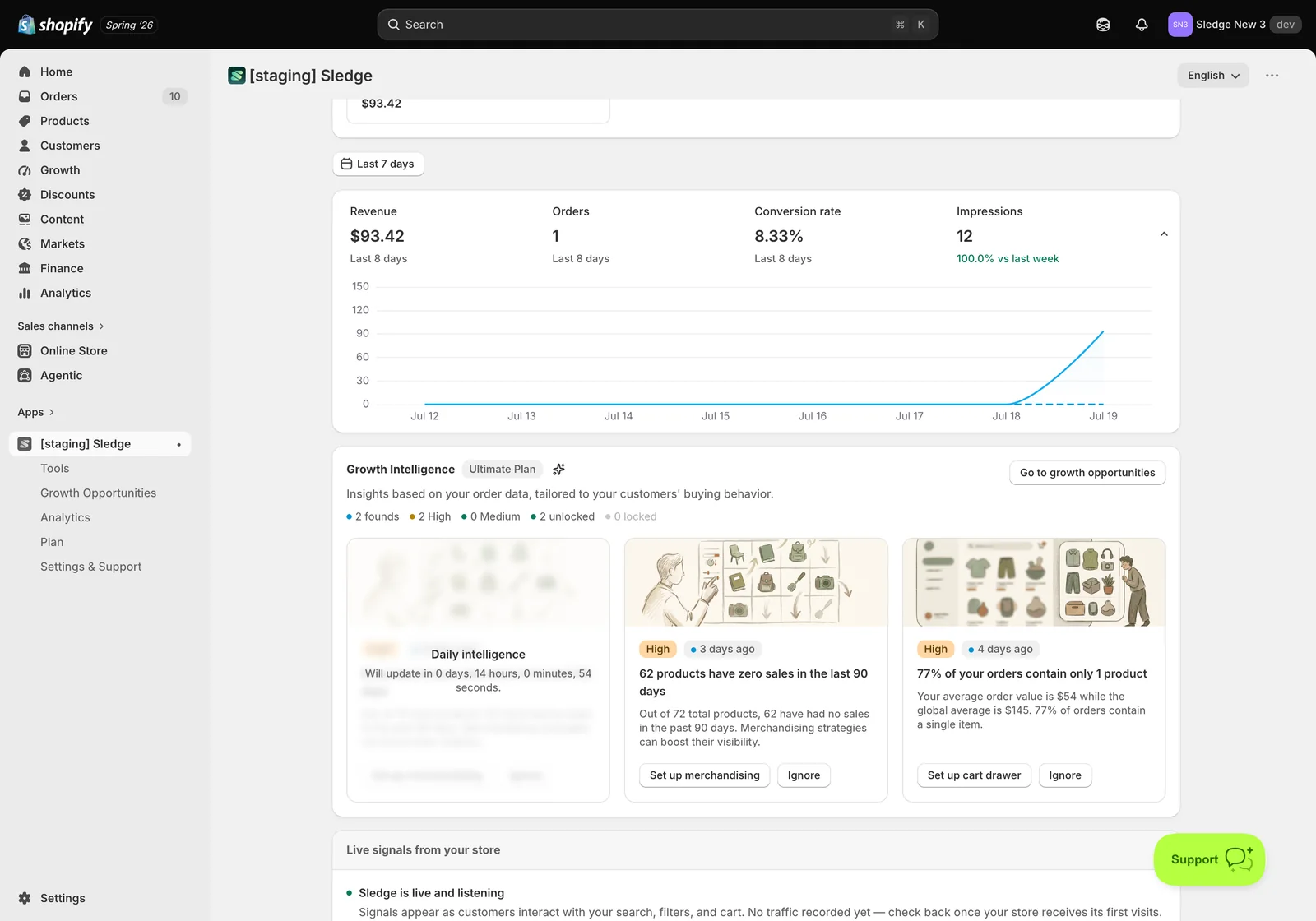
Above the Playbook sit the findings Sledge has raised from your order data, the same ones shown on your Dashboard, with View all findings to see the full set. Each has a priority, an observation about your store, a button that jumps to the fix, and Ignore to dismiss it.
The distinction is worth understanding: findings are reactive — specific problems spotted in your data. The Playbook below is proactive — the full set of best practices regardless of whether a problem has shown up yet. Findings tell you what’s broken; the Playbook tells you what’s possible.
Getting notified
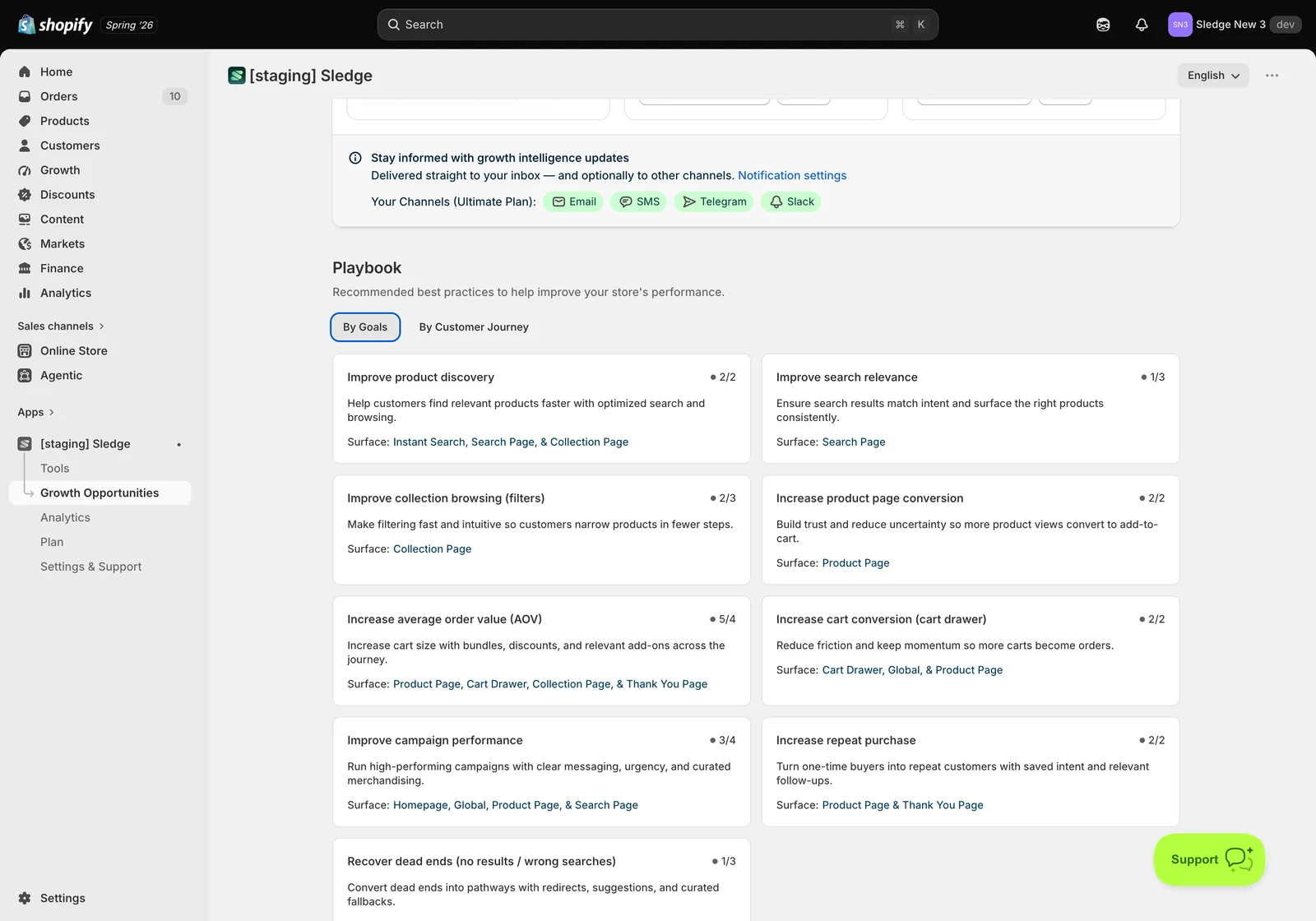
Stay informed with growth intelligence updates sends new findings to you rather than waiting for you to check. Available channels are Email, SMS, Telegram and Slack, and Notification settings is where you choose which to use. Worth switching on at least one — findings are time-sensitive, and the value comes from acting while the pattern is fresh.
The Playbook, By Goals
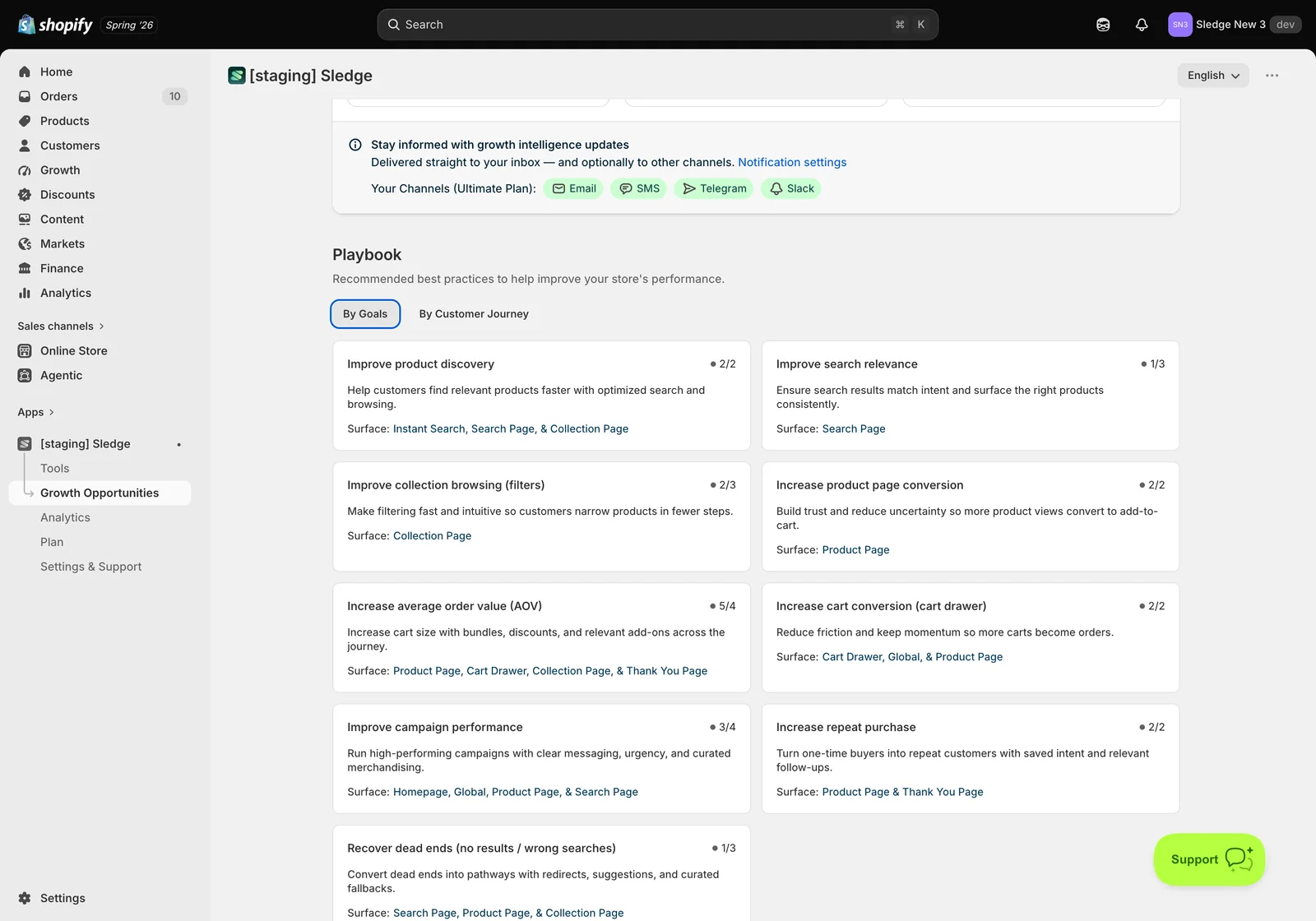
Choose the By Goals tab and the work is grouped into nine outcomes. Each card shows the goal, a progress count of its best practices, what it achieves, and the Surface it applies to:
- Improve product discovery — help customers find relevant products faster. Instant Search, Search Page & Collection Page.
- Improve search relevance — make results match intent consistently. Search Page.
- Improve collection browsing (filters) — let customers narrow down in fewer steps. Collection Page.
- Increase product page conversion — build trust so more views become add-to-carts. Product Page.
- Increase average order value (AOV) — grow cart size with bundles, discounts and add-ons. Product Page, Cart Drawer, Collection Page & Thank You Page.
- Increase cart conversion (cart drawer) — reduce friction so more carts become orders. Cart Drawer, Global & Product Page.
- Improve campaign performance — clearer messaging, urgency and curated merchandising. Homepage, Global, Product Page & Search Page.
- Increase repeat purchase — turn one-time buyers into returning ones. Product Page & Thank You Page.
- Recover dead ends — turn no-results and wrong searches into pathways. Search Page, Product Page & Collection Page.
Pick the goal that matches what you’re actually trying to fix. If your problem is a low average order value, go to the AOV goal — not whichever card happens to have the lowest score.
Inside a goal: the best practices
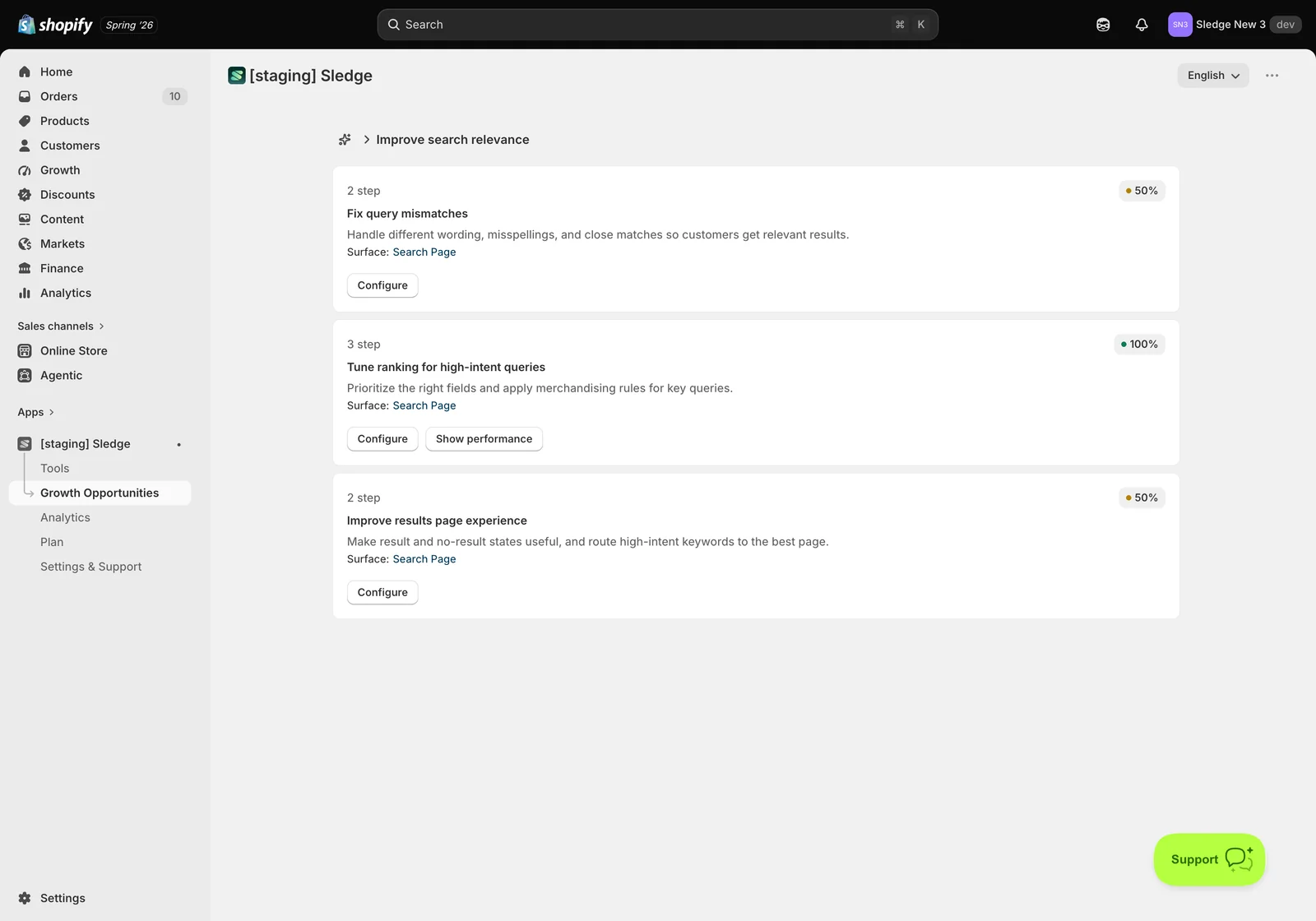
Click a goal and it opens to reveal the best practices that make it up. Each one shows how many steps it involves, a completion percentage, a description, the Surface it affects, and a Configure button. Practices already finished also offer Show performance so you can see what they earned.
Taking Improve search relevance as the example, it breaks into three practices:
- Fix query mismatches — handle different wording, misspellings and close matches so customers still get results.
- Tune ranking for high-intent queries — prioritise the right fields and apply merchandising rules to queries that matter.
- Improve results page experience — make both result and no-result states useful, and route high-intent keywords to the best page.
Inside a best practice: the actual settings
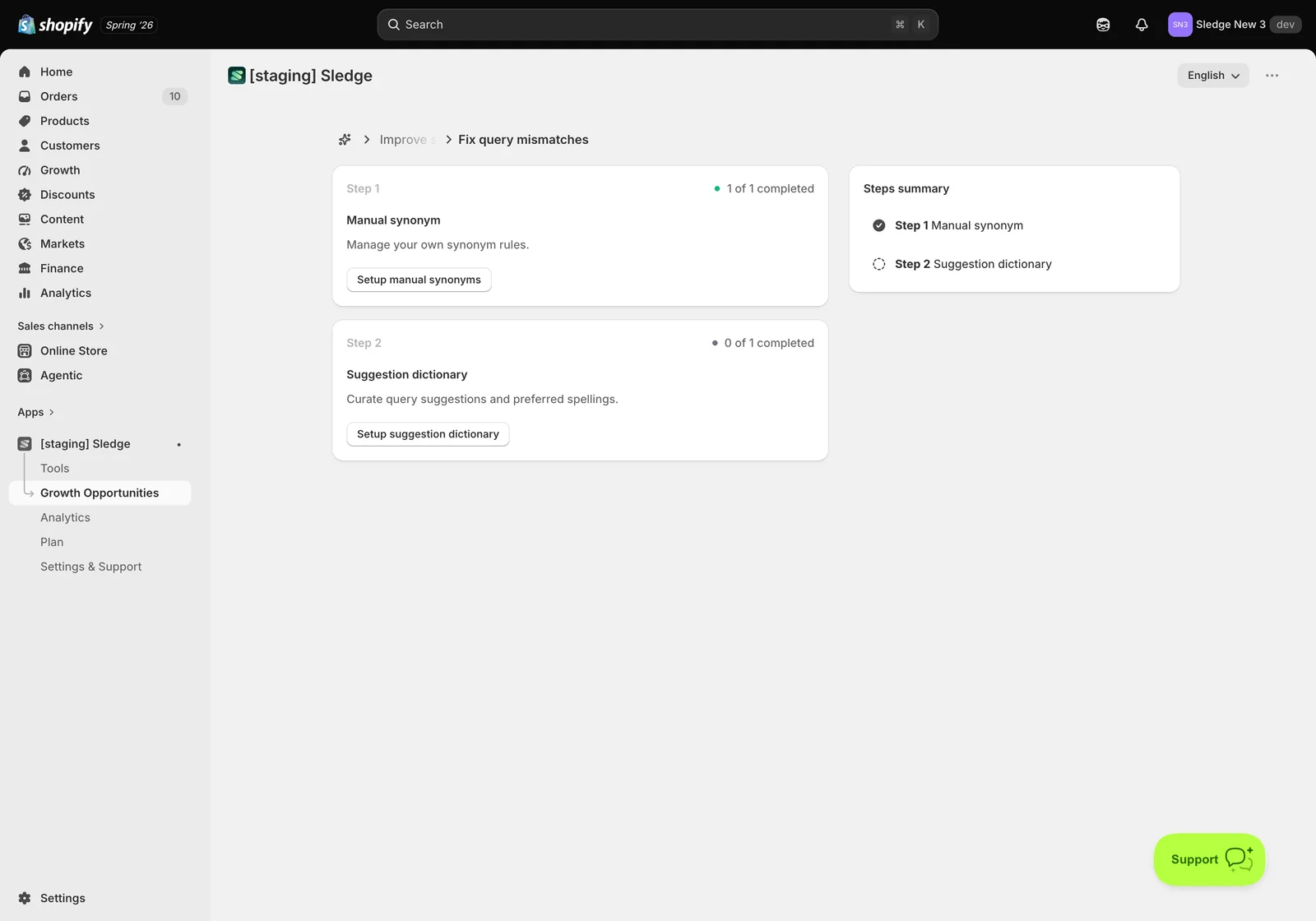
Click Configure and Sledge walks you through the specific settings, numbered as steps, with a Steps summary alongside so you can see where you are.
Continuing the example, Fix query mismatches has two steps:
- Step 1 — Manual synonym (1 of 1 completed): manage your own synonym rules, so a customer searching “sneakers” still finds products you call “trainers”. The button is Setup manual synonyms.
- Step 2 — Suggestion dictionary (0 of 1 completed): curate query suggestions and preferred spellings, so the dropdown guides customers toward searches that return results. The button is Setup suggestion dictionary.
This is the level that makes the Playbook useful. Each step names a real setting, explains what it does in plain terms, tracks whether you’ve done it, and links straight to the screen where you do it — so “improve search relevance” stops being an abstraction and becomes two concrete jobs.
A sensible way to work through it
- Deal with any High priority finding first — it’s a problem Sledge has actually observed in your data.
- Then pick the goal matching your current business priority, not the easiest one.
- Inside it, start with the practice showing the lowest completion percentage — that’s where the untouched work is.
- Work the steps in order; they’re sequenced so earlier steps support later ones.
- Come back after the next weekly monitor and check Est. potential and Goals completed have moved.
Not seeing progress? A step only counts as complete once the underlying setting is saved and enabled — configuring it without saving leaves the counter unchanged. If a goal seems irrelevant to your store, it’s fine to leave it; the score is a guide, not a grade. And if findings look sparse, that’s normal for a new store — Growth Intelligence reads order history, so it needs orders before it can say much.
Related
- Growth Opportunities by Customer Journey: fixing your store stage by stage
- Understanding your Sledge Dashboard: revenue, growth intelligence, and live signals
- How to Enable Sledge Core and Complete the Initial Setup ?
- How do I set up Best Seller recommendations?
- How to set up a promotion Banner?
- How do I set up Personalization?
Last updated on
Growth Opportunities by Customer Journey: fixing your store stage by stage
The Playbook in Growth Opportunities holds the same set of best practices in two arrangements. By Customer Journey is the one that follows your customer rather than your org chart — it lines the work
Integrations
Integrations in Sledge — 2 guides covering setup and day-to-day use.